BETA DocuPost AI, built into DocuPost

If you can describe it, it can mail it.

Tell DocuPost AI who and what you need to mail, in plain English. Messy data welcome. It gets the job ready and sends letters and postcards once you approve.

Things people throw at it

Split a combined 1,000-invoice PDF and mail each invoice to its customer
Clean up a messy CSV, then mail everyone on it
Turn a spreadsheet into personalized letters
Price a 6×9 postcard campaign before you commit
LiveTry it liveStart chatting free. Log in or sign up when it’s time to send.

Nothing mails until you approve it. AI can make mistakes, so check the confirmation.

Letters and postcardsPrepared, priced and sent from one conversation.
Attach your filesDrop in a PDF or an address list right in the chat.
You approve firstA confirmation shows the details before anything is sent.
On every planPay as you go for mail. No subscription commitments.
Throw anything at it

Jobs that used to need a developer. Now it’s one sentence.

Splitting PDFs, cleaning exports, matching documents to address lists, personalizing letters. No special mode and no forms to hunt through. Just describe the job in the chat at the top of the page.

Batch“Split this PDF of 1,000 invoices and mail each one to the address printed on its page”
Batch“Mail a PDF to everyone on a spreadsheet”
Clean up“This CRM export has names in one column and full state names. Clean it up so I can mail these letters”
Certified“Send a certified letter with return receipt to Jordan Lee, 88 Market St, Columbus, OH 43215”
Price“How much does a 6×9 postcard cost?”
Match“Match each statement in this PDF to the right row on my address list, and mail them”
Track“Has my last letter been delivered?”
Personalize“Write a renewal reminder to each person on this list, use their name and end date, and mail the letters”
Price“How much would it cost to send a 6×9 postcard to everyone on this list?”
Reformat“This accounting export doesn’t match your CSV template. Reformat it and use it for this mailing”
Write“Write a polite past-due notice and mail it to this customer”
Cancel“Cancel the letter I just sent, if it hasn’t been printed yet”
Batch“Send each lease notice in this packet to the tenant address on its page”
Look up“Show me the mail I sent last week”
Compare“What would color cost compared with black and white for this letter?”
Write“Draft a thank-you letter and mail a personalized copy to everyone on this list”

Example: invoices

Got one giant PDF of 1,000 invoices? Mail each one to its customer.

Your billing system exports one big PDF with every customer’s invoice stacked together. Normally someone splits it by hand, or you pay a developer to build a connector. With DocuPost AI, you attach the file and say “mail each invoice to the address on it.” It splits the file, reads each address, shows you the price and asks for your approval. We’ve validated this with a single PDF of 1,000 invoices.

1 What you have
PDFBill toPriya Shah214 Elm St
Denver, CO
1 file, 1,000 invoices

One giant PDF

Your billing system exports every customer’s invoice stacked together in one file.

2 You tell DocuPost AI
Mail each invoice to the address on it.
DocuPost AI Splits the file into single invoices Reads each address Shows the price and asks you to approve

One sentence

No manual splitting, no mail merge, no developer building a connector.

3 What goes out
Priya ShahDenver, CO
Marcus WebbTampa, FL
Elena RuizAustin, TX
and so on, one letter per invoice

A letter for every customer

Each invoice goes out on its own, to the address printed on it.

See the real conversation

The same idea, step by step, in a 10-invoice example you can click through.

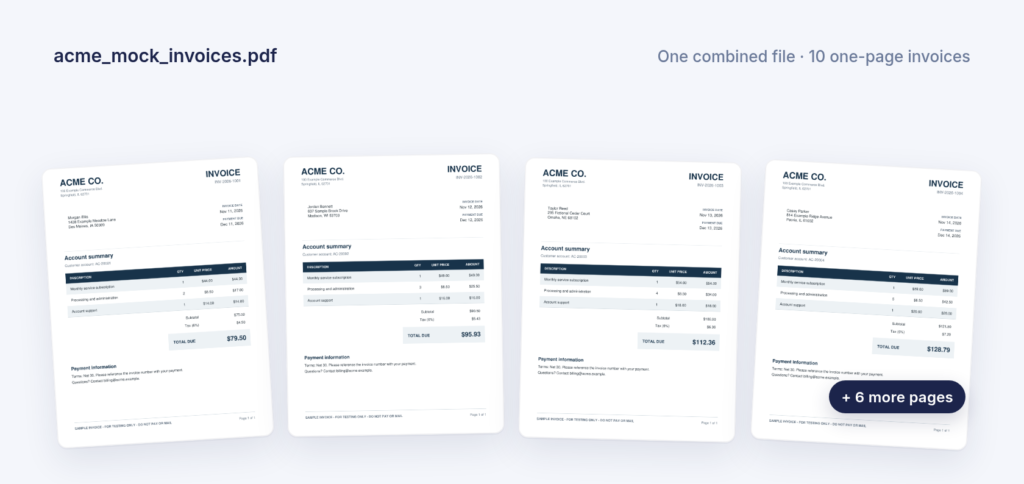
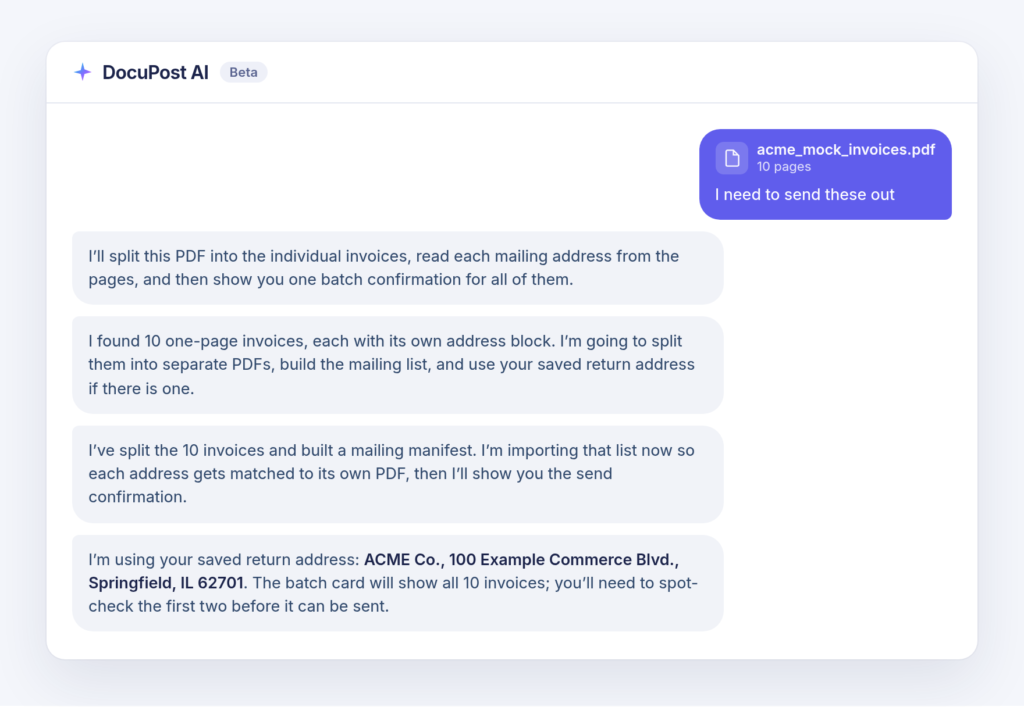
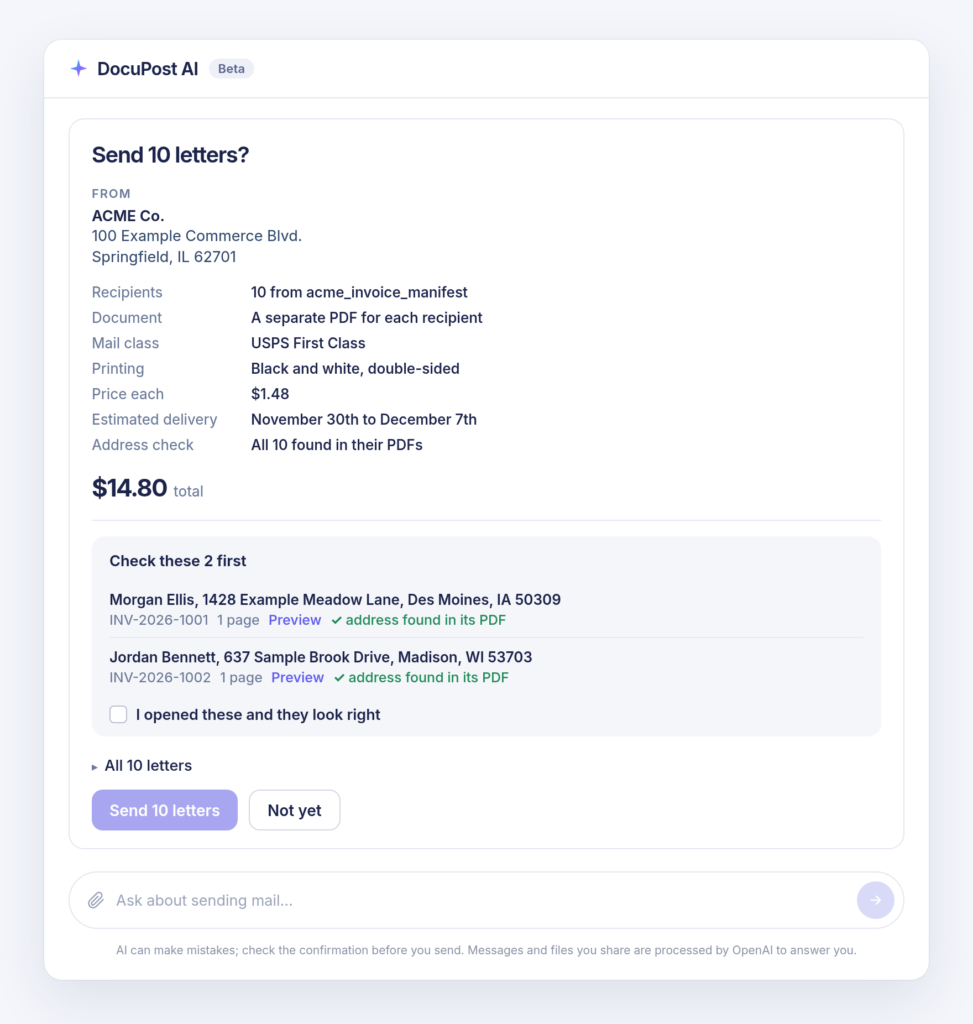
Example walkthrough: four pages from a combined PDF of ACME Co. invoices, with a badge for six more pages in the 10-page example file Example walkthrough: the assistant splits the invoices, reads the addresses and builds a mailing manifest Example walkthrough: one batch confirmation for 10 letters with a spot-check before Send Example walkthrough with a 10-invoice PDF

The walkthrough graphics show a 10-invoice version of this example. Prices and delivery dates in the confirmation are from that example, not a rate card for every mailing. Names and addresses are fictional.

You stay in control

Powerful, and it asks first.

The assistant does the tedious part. You make the call before anything goes out.

Approval before mailing

Nothing is mailed until you approve it. The assistant shows a confirmation first.

Spot-checks on batches

For a batch like the invoice example, it can ask you to open a couple of letters and confirm they look right before Send unlocks.

The price up front

The confirmation shows the recipients, the files, the options and the price, so you can check them before you send.

It’s in Beta, and AI can make mistakes. Treat it like a capable teammate: review what it prepares and check the confirmation carefully. Messages and files you share are processed by OpenAI to answer you.
FAQ

Good questions.

Straight answers about what it does, what it costs, and where it stops.

Ask the assistant instead

What can DocuPost AI do?

It sends letters and postcards from a plain-English request. It can also quote a price before anything goes out, write a letter for you, look up mail you’ve already sent, and cancel a letter or postcard that hasn’t been printed yet.

Attach a PDF or an address list and it can help get them ready: for example, splitting a combined PDF, matching documents to an address list, or cleaning up a messy export so it can be mailed. If you can describe the mailing, you can usually start it with a sentence.

What does it cost?

The assistant is available on every plan, including the free plan. You pay for the mail you send, pay as you go with no subscription commitments. Letters start at 95¢ and postcards at 99¢; the confirmation shows the exact price before you send. See pricing for the details.

Do I need an account to try it?

You can start a conversation right here. When it’s time to send, you’ll be asked to log in or sign up. New to DocuPost? Get started free.

Will it mail anything without asking me?

No. Nothing is mailed until you approve it, and the assistant shows a confirmation first. For batches it can ask you to spot-check letters before Send unlocks. AI can make mistakes, so check the recipients, files, options and price.

Why is it labeled Beta?

DocuPost AI is new and we’re still improving it. It’s capable, but it can make mistakes, so review what it prepares and check the confirmation before you send.

Can I use it on an account with a signed BAA (HIPAA)?

No. Messages and files you share with the assistant are processed by OpenAI, and that processing isn’t HIPAA compliant. So the assistant isn’t available on accounts with a signed BAA. The rest of DocuPost works as it does today. If you don’t have a BAA, don’t share protected health information with the assistant.

How is this different from the MCP server?

The MCP server connects DocuPost to apps like Claude and ChatGPT. DocuPost AI is the assistant built into DocuPost itself, so there’s nothing to connect, and you can attach PDFs and address lists directly. Both use the same DocuPost account. Learn about MCP.

Your next mailing can start as a sentence.

Ask for what you need and see how far one request goes. No job is too big or too small.

Pay as you go, with no subscription commitments.